
Compare the practical differences in speed, queue handling, JDownloader support, and daily quotas across Free, Premium, and Premium Pro tiers.
Direct Tier Comparison
| Feature | Free Tier | Premium | Premium Pro |
|---|---|---|---|
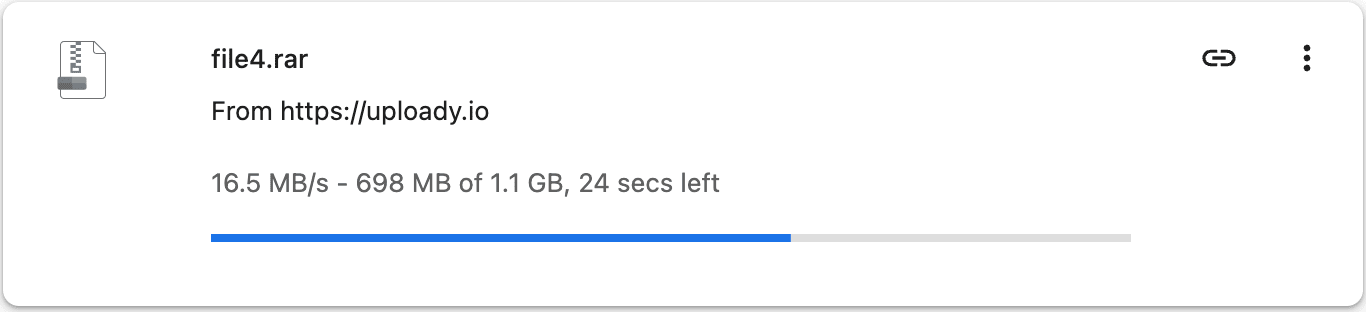
| Measured Speed | ~461 KB/s in testing | 16.5 MB/s single; 42 MiB/s JD2 | Same speed profile; designed for higher volume |
| Daily Bandwidth | Restricted & throttled | 50–150 GB/day | 80–300 GB/day |
| JDownloader 2 | Impractical | Fully supported | Fully supported |
| Download Resume | No | Yes | Yes |
| Parallel Tasks | 1 file at a time | Multiple concurrent files | Multiple concurrent files |
| Waiting / CAPTCHA | 60s timer + CAPTCHA | Instant start | Instant start |
| File Retention | 3–30 days | Plan duration + 60 days | Plan duration + 60 days |
Visual Speed Difference

Is Premium Pro Faster Than Premium?
No. Premium Pro does not grant elevated bandwidth priority over standard Premium. Pro plans exist solely to provide larger daily download allowances (up to 300 GB/day vs 150 GB/day). Buy Pro only if your daily queue exceeds standard allowances. Detailed plan pricing is available in our Uploady Pricing Breakdown →.
Decision Matrix
Occasional Small Files
Best when files are small (<100 MB), non-urgent, and you don't mind manual CAPTCHAs.
Most Regular Users
Best for multi-part archives, batch queues, and JD2 automation under 150 GB/day.
High-Volume Queues
Required when downloading very large media archives exceeding 150 GB within 24 hours.